📄 Create, upload, or correct
Create a new play by typing it

💡 Creating a new text is done on the www.imparato.io website, preferably on a computer.
😲 Typing in a text can seem like a long and tedious task. Look at it as an extra way to start getting a handle on your script. Plus, our editor offers tips and syntax highlighting to make it easier, and you can ask your castmates to help write it. 😌
Step 1: enter the basic information
- Log in at www.imparato.io with your usual credentials to access your personal space if you haven't already
- At the top of the screen, click the Create button, then Create a text
- Select the I'll type my text mode
- Fill in the fields, then click Continue
💡 If you're an admin of a shared company, you can choose to place your new text directly there: that way you can write it together, and every member can contribute.
- Here you are in the Imparato text editor, the stage is yours!
Step 2: write and vocalize
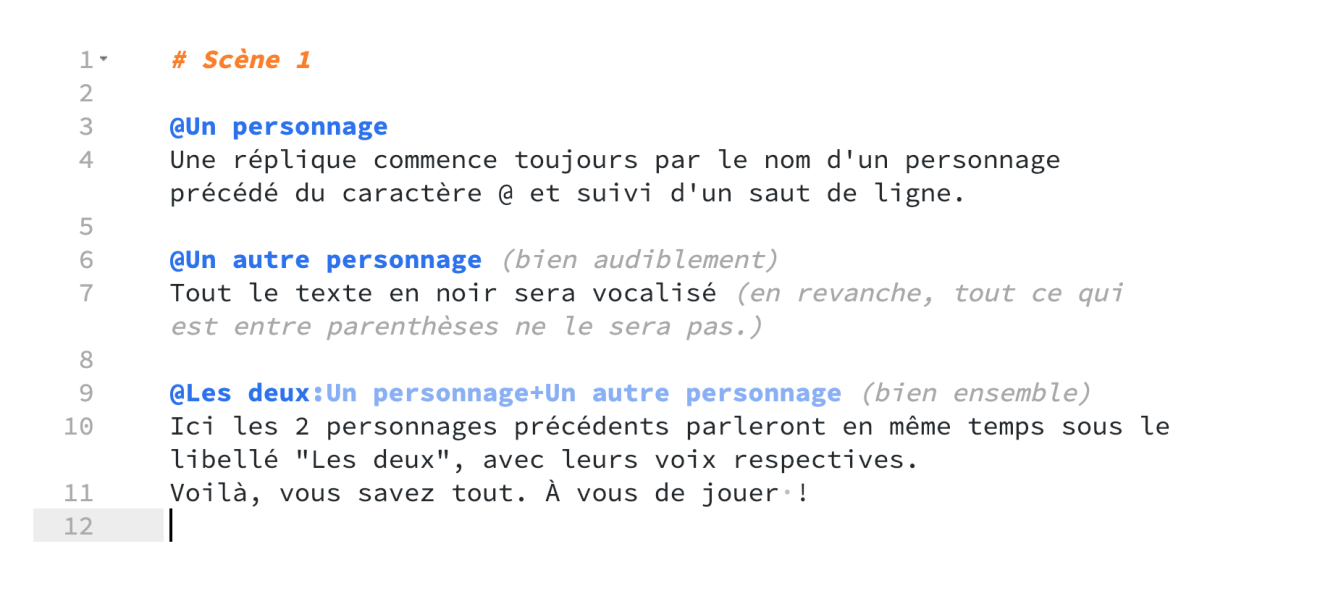
Your text is now created; you're in the editor with an example script formatted for vocalization. You can choose to delete everything, but we recommend adapting the example to your needs instead. This will help you quickly get the hang of the Imparato formatting.
All your changes are saved regularly as a draft. This way, if you accidentally close the window or want to pick it up later, nothing will be lost 😅
- When you're finished, click Ready to vocalize?
- Assign each role its gender, Male or Female
- Check the Spoken language, then start the vocalization. This step can take anywhere from a few minutes to nearly an hour depending on the length of the text
- Once the vocalization is complete, the text is ready for rehearsal on the website and in the app
- Well done, you now have a text ready to learn and rehearse!
Was this information useful to you?
Thank you!